---
title: CSS Cursors
---
## CSS Cursors
The cursor property specifies the type of cursor to be displayed when you hover over an element. It has 39 possible values:
• `cursor: alias;`
• `cursor: all-scroll;`
• `cursor: auto;`
• `cursor: cell;`
• `cursor: context-menu;`
• `cursor: col-resize;`
• `cursor: copy;`
• `cursor: crosshair;`
• `cursor: default;`
• `cursor: e-resize;`
• `cursor: ew-resize;`
• `cursor: grab;`
• `cursor: grabbing;`
• `cursor: help;`
• `cursor: move;`
• `cursor: n-resize;`
• `cursor: ne-resize;`
• `cursor: nesw-resize;`
• `cursor: ns-resize;`
• `cursor: nw-resize ;`
• `cursor: nwse-resize;`
• `cursor: no-drop;`
• `cursor: none;`
• `cursor: not-allowed;`
• `cursor: pointer;`
• `cursor: progress;`
• `cursor: row-resize;`
• `cursor: s-resize;`
• `cursor: se-resize;`
• `cursor: sw-resize;`
• `cursor: text;`
• `cursor: vertical-text;`
• `cursor: w-resize;`
• `cursor: wait;`
• `cursor: zoom-in;`
• `cursor: zoom-out;`
• `cursor: initial;`
• `cursor: inherit;`
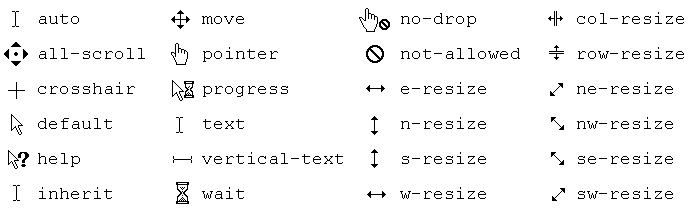
You can also set an image as the cursor.
Note: Always specify a default cursor at the end incase the specified cursor is unavailable.
```
.custom-cursor {
cursor: url(cursor-image.png), auto;
}
```
#### More Information:
* Check the above cursor values in action: codepen
* Mozilla Developer Network: MDN
* Browser Support: caniuse
* Cursor examples by w3schools: w3schools